
On Page SEO Explained Simply
Many people assume SEO is a highly technical subject that requires coding knowledge, complicated software, and some mythical understanding of the magic words that make search engines work. That reputation can make the whole topic feel intimidating, especially if you want your website content to appear in search results. In reality, much of SEO improvement happens directly within a page's content, and many of the most effective changes are surprisingly straightforward.
This is where on-page SEO comes in. On-page SEO can be anything that you do inside a webpage with the intent of helping search engines to understand what the content is about and when they should show you above your competitors in search results. These improvements often involve things you already recognize, such as writing clear page titles, organizing information with headings, using relevant keywords, adding useful links, and creating content that genuinely helps readers. In this guide, you will learn the most important on-page SEO practices explained in simple terms. Once you understand these basics, improving a page becomes much easier.
What On-Page SEO Actually Means
On-page SEO refers to the improvements you make directly on a webpage to help search engines understand its content. These changes occur on the page itself rather than elsewhere on the internet. In simple terms, you are adjusting the elements that make up the page so both readers and search engines can clearly understand what the page is about.
Examples of on-page SEO include improving the page title, organizing the content with headings, writing clearer explanations, and linking to related pages on your website. These adjustments help logically structure the page. When information is organized clearly, search engines can interpret the topic more easily.
It is also helpful to understand how this differs from off-page SEO. Off-page SEO focuses on signals from outside your website, such as backlinks and mentions. On-page SEO, by contrast, is mostly about clarity and usefulness within your own content.
Start With A Title
The first thing that most users will see on search engine results pages (also known as SERPs, if you're feeling particularly pretentious…) is your page title. It's also one of the first signals that search engines will use to understand what your content is about. It usually appears as the clickable headline in search results, which means it plays an important role for both search engines and readers. A clear title helps search engines categorize the page and decide which searches it might be relevant for.
Good titles usually describe the topic directly and include the page's main keyword. At the same time, they should remain natural and easy for people to read. A title that sounds helpful and clear often performs better than one that is vague or overly complicated.
For example, a title like Website Advice does not reveal much about the page. A more descriptive title, such as On Page SEO Tips for Beginners makes the topic immediately clear. Titles influence how easily a page appears in search results and how likely someone is to click on it.
Use Headings to Organize Information
Headings help organize your content into clear sections. Instead of presenting a long block of text, headings allow you to break the page into smaller, more manageable parts. This structure makes the content easier for readers to follow and understand.
Imagine you have a blog post titled "Best winter holidays 2026" and think about how you'd structure that article. Having a long story about the time you went travelling probably isn't going to work, which is why most articles like this are a list of destinations, followed by reasons why they're good places to go. Most webpages can be broken down in the same way, and there's specific on-page markup that you can use to follow the simple hierarchy of headings. Start with your main title (Heading 1, sometimes written as <h1>), then for each subsection use a Heading 2 (<h2>). If you need more granularity, you can use up to H6, but most people won't use more than an H3 in content.
Following this structure improves readability because visitors can quickly scan the page and find the information they need. Search engines also analyze headings to understand how information is organized. When headings reflect the main ideas of the page, they provide additional clues about the topic.
Write Content That Matches Search Intent
Search intent refers to the reason someone performs a search. When a person types a query into a search engine, they are usually trying to accomplish something specific. Search engines attempt to identify that goal and display results that are most likely to satisfy it.
For example, someone searching for how to start a blog is probably looking for a beginner-friendly guide. They expect clear explanations and a step-by-step process, rather than a vague discussion of blogging. Pages that directly match this expectation are more likely to perform well in search results.
When creating content, it helps to focus on answering the main question clearly. Provide explanations that are easy to follow and include practical examples whenever possible. Many SEO professionals believe that satisfying search intent is one of the strongest signals search engines use when evaluating a page.
Use Internal Links to Connect Your Content
Internal links connect one page on your website to another. These links help guide readers toward related information that may expand on the topic they are exploring. When used thoughtfully, they can improve the overall experience for visitors.
Internal links also help search engines discover and understand your content. When search engines crawl your website, these links show how different pages relate to each other. This structure helps them map out the topics your website covers.
For example, a page explaining on-page SEO might link to other articles about keyword research or beginner blogging tips. These connections create a network of related information across your website. Over time, internal linking helps build a clearer content structure that benefits both readers and search engines.
Optimize Images and Page Readability
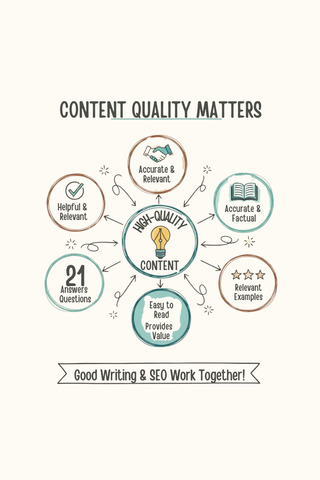
SEO is not only about keywords and links. It also involves making sure your page is easy for people to read and understand. When visitors can quickly absorb the information on a page, they are more likely to stay longer and continue exploring your website.
Images can help support the content by illustrating ideas or breaking up large sections of text. Adding descriptive alt text to images helps search engines understand what the image represents. This small step can improve accessibility and add additional context to the page.
Readability also matters. Shorter paragraphs and clear formatting make the content easier to scan. Avoid large blocks of text whenever possible, since they can make a page feel difficult to read. When readers engage comfortably with a page, many experts believe search engines interpret this as a positive quality signal.
Keep URLs Simple and Descriptive
A URL is the address used to access a page on your website. While it might seem like a small detail, a clear and descriptive URL can help both readers and search engines understand what the page contains. Simple URLs are often easier to remember and easier to share.
For example, a URL such as example.com/page?id=7823 provides little information about the page's content. A clearer alternative would be example.com/on-page-seo-guide. The second version gives an immediate hint about the topic.
Descriptive URLs also reinforce the page's overall subject. Try to include your main keyword in the URL, and use the URL as an opportunity to reference the main topic of the article. By doing this, search engines can use it as another intent signal, allowing them to understand what your content is about more accurately. Don't overdo it, though; having too many keywords in your URL can come across as spammy or an attempt to game the system, which might result in a punishment. Trying to keep your URLs simple is a small improvement that contributes to a clearer and more organized website.