

Website Architecture 101: Categories vs. Tags
When you first log into your WordPress dashboard and look at the "Posts" menu, you will see two small options that often cause a massive amount of confusion for new bloggers: Categories and Tags. At first glance, they seem to do the same thing. They both help you group your content together. Because of this, many beginners fall into the trap of treating them like a free-for-all filing system. They might create fifty different tags for a single post or ignore categories entirely.
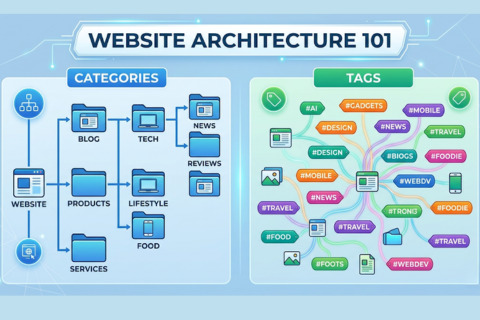
This is a mistake that can haunt and hurt your blog for years to come. Website architecture is basically the blueprint of your digital home. If you don’t organize it well, your readers are going to get completely lost, and search engines like Google will have a really hard time understanding what your site is actually about. Think of your blog as a library. Categories are the large signs hanging from the ceiling telling you where the "History" or "Fiction" sections are. Tags are like the index at the back of a specific book. Both are useful, but they each serve a very different purposes.
By the end of this guide, you will understand exactly how to use these two tools to build a site that is easy to navigate, professionally organized, and optimized for growth in 2026.
The Foundation of Your Blog: Defining Categories
Your categories are the main sections of your digital library. They cover the wide-ranging topics you return to again and again. If you were running a travel site, these would be your "Europe" or "Asia" sections. Think of them as the foundation of your blog—the main pillars that keep your content organized and easy to navigate.
One of the most important rules for a new blogger is to keep your categories fairly limited. Ideally, you should start with somewhere between three and seven categories. If you have twenty categories but only two posts in each, your site will feel empty and really disorganized. A well-structured blog uses categories to create a logical path for the reader to travel through. When a visitor clicks on a category, they expect to see a collection of articles that all fit under that specific umbrella.
Categories can be hierarchical, meaning you can stack sub-categories (like France) under a main one (like Europe). It’s great for organization, but don't feel like you have to go overboard when your blog is brand new. Start with your main pillars. Just don't forget to actually select one! If you don't, WordPress defaults to "Uncategorized." It looks unprofessional and, frankly, it’s a wasted opportunity to tell Google what your post is actually about.
The Fine Details: Using Tags Effectively
If categories act as the structural "bones" of your site, tags are the fine details. They’re much more specific and—truth be told—completely optional. Use categories to define the general "what" of your content, and save tags for the "who," the "where," and the one-off specifics that help readers find exactly what they’re looking for.
Let’s go back to that travel blog example. If you write a post about the best pizza spots in Paris, your category would be "Europe" or "France." Your tags, however, might be "Pizza," "Street Food," "Budget Dining," or "Paris." These tags allow a reader who is specifically interested in "Street Food" to find every mention of it across your entire site, regardless of which country (category) you were writing about at the time.
The biggest mistake beginners make with tags is creating too many of them. Some bloggers think that adding thirty tags to a post helps with SEO. In reality, it does the opposite. In the early days of the internet, tags were used by search engines to understand content, but that is no longer the case. Today, having an excessive number of tags creates "thin content" pages on your site that can actually hurt your ranking. Use tags sparingly—only create a tag if you plan on having at least several posts that will eventually use it.
How Site Structure Influences Your Search Ranking
Think of Google as a researcher looking for a specialist. It checks your site's structure to see if you have real "authority" on what you're talking about. This is the power of a good information silo. If you have a dedicated "Healthy Recipes" category packed with fifty great posts, Google recognizes that depth. It signals that you aren't just dabbling—you're a subject matter expert.
A cluttered site with fifty aimless categories is an absolute nightmare for Google’s crawlers. If they can't make sense of your structure, your indexing—and your rankings—will suffer. Instead, keep it simple. A logical hierarchy will help search engines easily glide through your site, ensuring that "link juice" actually reaches your articles instead of always getting stuck at the front door.
Furthermore, in 2026, user experience signals are a massive part of SEO. If a user lands on your site and finds it easy to click through your categories to find more of what they like, they stay on your site longer. This tells Google that your site is valuable. On the other hand, if a user is overwhelmed by a cloud of 100 random tags and can't find a navigation menu that makes sense, they will leave immediately. This "bounce" tells Google your site might not be the best result for that search.
Navigating the One Category vs. Multiple Categories Debate
A common question for new bloggers is whether a single post can live in multiple categories. Technically, WordPress allows you to check as many boxes as you want. However, from a professional design and SEO perspective, it is best to stick to one category per post.
When you put a post in multiple categories, it can create "duplicate content" issues. While modern WordPress setups are better at handling this, it still confuses the "breadcrumb" navigation—the little trail of links often seen at the top of a page (e.g., Home > Travel > Europe). If a post is in three categories, which path should the breadcrumb show?
If you’re constantly tempted to put a post in two or more different categories, it’s usually a red flag that your topics are overlapping. Take "Vegan Recipes" and "Breakfast"—if you're checking both boxes every time you post, you might be better off making "Breakfast" a sub-category or even just a tag. Sticking to a "one post, one category" rule might feel restrictive at first, but it forces you to stay organized and makes your site way more intuitive for actual people to navigate.
Planning Your Architecture Before You Build
The best way to avoid a mess is to plan your structure before you start hitting "Publish" on dozens of posts. Take a piece of paper or a digital notepad and write down the five main topics you want to be known for. These are your categories. Everything you write should fit into one of these buckets. If you find yourself writing a post that doesn't fit into any of them, you either need a new category or you are drifting away from your blog's niche.
Once your categories are set, look for those recurring themes that pop up across your different topics—those are your tags. If you’re a tech blogger with categories like "Laptops" and "Smartphones," you’ll likely mention "Apple" in both. That’s exactly where a tag comes in. Since "Apple" or "Budget-Friendly" applies to all sorts of gear, using them as tags lets you connect the dots without cluttering up your main structure.
As your blog grows over the next year, revisit your categories. You might find that one category is getting huge while another is empty. It is perfectly okay to rename or merge categories later on, but starting with a solid plan prevents you from having to do a massive, painful reorganization down the road.
Creating a User-Friendly Experience
Ultimately, you are building this blog for people, not just for Google. A clear architecture makes your blog feel like a curated experience. When a reader finishes an article they enjoyed, their first instinct is often to look for "more like this." If your categories are clear and displayed in your menu or at the bottom of the post, you make it easy for them to stay and keep reading.
Think of your website architecture as the way you respect your reader's time. Don't make them hunt for information. Use categories to guide them through the big ideas and tags to help them find the specific nuances. When you get this balance right, you aren't just a person with a blog; you are an organized resource that people—and search engines—will trust and return to time and time again. This foundation is what separates the hobbyists from the professional bloggers in 2026.
To read about Common SEO Mistakes to Avoid, read this post here .
To learn about Content Strategy, read these.